
02. Accelerate and stop
Move a stationary cart 10 m and stop exactly at the destination. Acceleration is limited to ±2 m/s². When should you accelerate, and when should you brake, to arrive as soon as possible?
| Item | Definition |
|---|---|
| States | Position , velocity |
| Control | Acceleration |
| Objective | Minimize arrival time |
| Phases | Two phases, 12 nodes each; free knot and final times |
| New concepts | Two states, control bounds, and phase splitting |
Situation
Section titled “Situation”Example 01 chose velocity directly. A real vehicle instead controls acceleration. Velocity accumulates from acceleration and cannot change instantly, so both position and velocity are states. Braking too early wastes time; braking too late overshoots the destination.
Formulation
Section titled “Formulation”Dynamics
Section titled “Dynamics”There is no friction or drag. The control affects position through two successive integrations.
Boundary conditions
Section titled “Boundary conditions”The final time is unknown.
Constraints
Section titled “Constraints”Positive acceleration speeds up the cart; negative acceleration brakes it. The same bounds apply in both phases.
Phases
Section titled “Phases”Split time at an unknown . Position and velocity are continuous at the knot, but acceleration may jump. The optimum has one acceleration switch, so the knot can represent it exactly.
Objective and parameters
Section titled “Objective and parameters”| Symbol | Parameter | Value |
|---|---|---|
PARAMETERS["distance"] | 10 m | |
PARAMETERS["max_acceleration"] | 2 m/s² |
Initial guess
Section titled “Initial guess”Use phase times s, position linear from 0 to , constant velocity , and zero acceleration. This does not satisfy the zero endpoint velocities. The solver adjusts times, states, and controls to satisfy them and shorten the motion.
Results
Section titled “Results”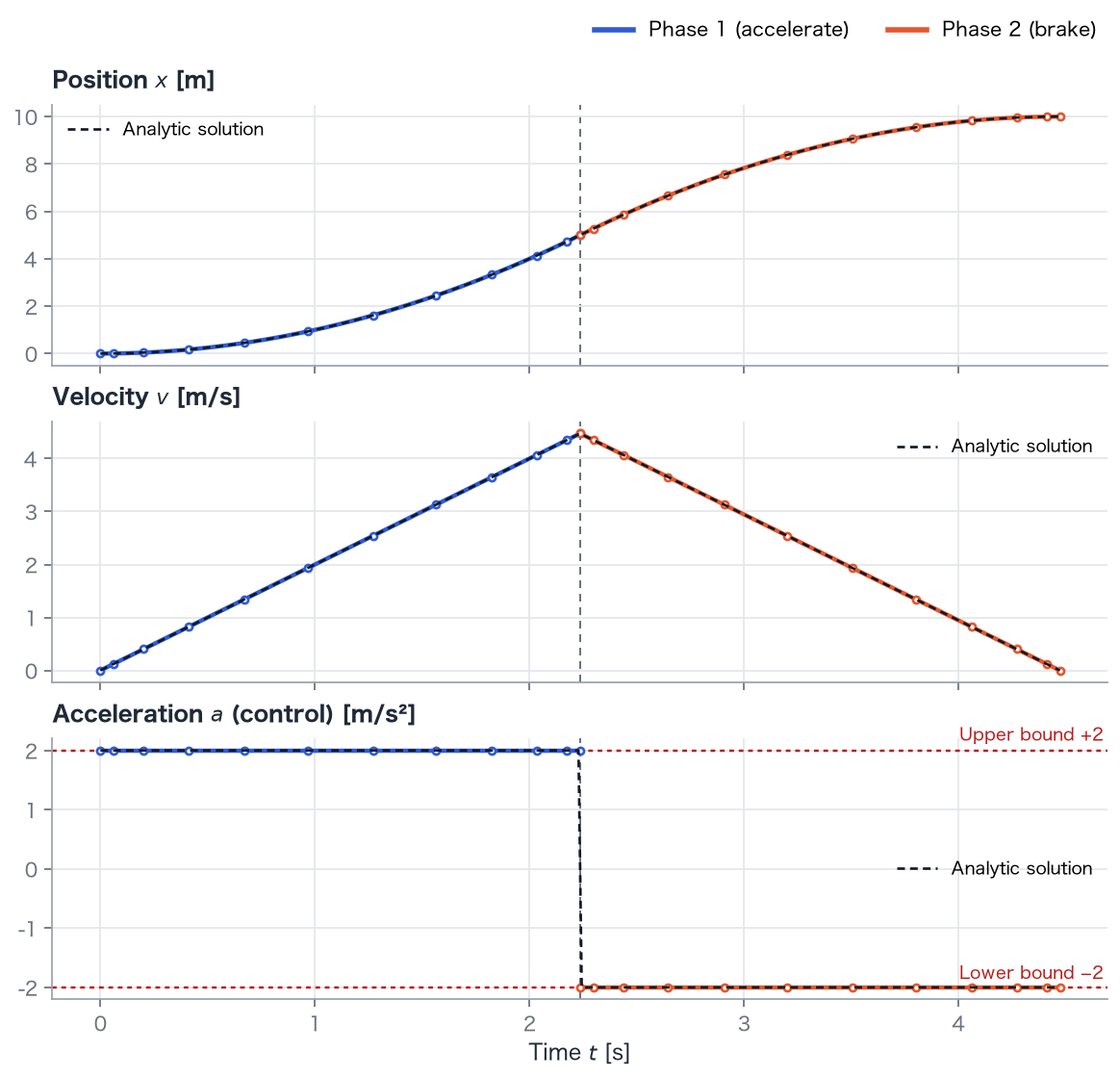
- Arrival time: 4.472 s, agreeing with 4.472 s.
- Switching time: 2.236 s, at position 5.00 m and peak velocity 4.472 m/s.
- Acceleration is throughout phase 1 and throughout phase 2. The velocity history is triangular.
Explanation
Section titled “Explanation”Why maximum acceleration and maximum braking?
Section titled “Why maximum acceleration and maximum braking?”The area under the velocity curve is distance, fixed at 10 m. We want that area with the smallest possible width in time. The curve must start and finish at zero, and its slopes cannot exceed . The narrowest possible shape is a triangle with the steepest allowed rise and fall. A trapezoid or rounded curve needs more time for the same area.
A control that stays at one bound or the other and switches between them is bang-bang control (indirect derivation).
Duration
Section titled “Duration”Symmetry places the switch at . From ,
Peak velocity is m/s.
Why split the phases?
Section titled “Why split the phases?”A smooth polynomial cannot represent the acceleration jump accurately and oscillates near it. With a knot at the switch, acceleration is constant in each phase and position and velocity remain continuous (multiple phases).
Try it
Section titled “Try it”- Set distance to 40. Arrival time doubles to s: quadrupling distance doubles time.
- Change the time guess from
Problem([0, 3, 6], ...)toProblem([0, 1, 6], ...). The solver may report success with a knot near 1.32 s, a switch spread across several nodes within phase 2, and duration about 4.50 s. This shows why knot placement matters. - Call
solve(nodes=4)instead ofsolve(). The phasewise polynomial solution remains accurate with fewer nodes.
uv run python examples/02_move_stop.py